Maximising Efficiency in Small Businesses: How Bitrix24 Can Transform Your Workflow


Small business workflows usually fail quietly. A customer message sits in someone's inbox. A sales follow-up gets forgotten after a busy week. A task gets discussed in chat but never formally assigned.
None of these looks serious alone. Together, they create drag that costs real time and revenue before anyone names it as a problem.
And that drag hits a small team harder than a large one, not softer.
There's less spare capacity to absorb a missed task, fewer people to notice it, and less room for admin that doesn't bring in money. One slip shows up the same day.
Bitrix24 puts tasks, communication, and CRM in one system, so routine work runs on shared records instead of on whoever happens to remember it.
What follows is where the friction comes from, how that consolidation helps, and where it falls short.
What Bitrix24 Workflow Automation Means for Small Businesses
In practice, this means moving routine activity out of ad hoc chat, scattered spreadsheets, and individual memory into a shared operating system. Connected tools inside one platform cut manual admin, standardize repeatable actions, and make day-to-day work visible.
The point is to cut the low-value coordination around the real work so common actions happen reliably, rather than depending on whoever remembers them.
For a small team, that spans a lot of everyday activity:
- Task assignment and deadline reminders
- Approval requests and internal notifications
- CRM-driven follow-ups and customer record updates
- Status changes everyone can see without asking
One environment, not a connected stack
Bitrix24 differs from a pile of separate apps because collaboration and customer operations live in the same place. You're not wiring one tool for chat to another for tasks to a third for sales records and hoping data transfers cleanly between them. Tasks, communication, and CRM activity reference the same records and timelines.

That changes how information moves. A customer conversation stays connected to sales activity. A project discussion keeps its task history. A reminder doesn't depend on someone remembering to create it.
The result is less operational leakage, the work that falls through the gaps between systems and people, which is where a lot of small-business inefficiency actually sits.
Why workflow automation matters for time, output, and team productivity
Automation's real payoff is fewer dropped balls, not raw speed. Response times, task accountability, and customer consistency all improve when routine actions run on system logic instead of manual chasing.
The coordination tax
Asana's Anatomy of Work Index puts 58% of the average workday on coordination rather than skilled or strategic work: checking who owns something, searching message threads, asking for status, reminding colleagues, re-entering information.
None of it is output, but it fills the day.
For small business owners the figure is sharper. A 2024 Slack survey of 2,000 U.S. small business owners found they lose about 96 minutes of productivity a day, roughly three weeks a year. Using four or more apps daily was a main culprit, alongside waiting on status updates from multiple tools and people (28%) and switching between apps (17%).
Where the time goes instead
Automation frees time by cutting the constant human prompting:
- A sales rep spends less time remembering follow-ups
- A manager spends less time manually checking task status
- An operations lead spends less time assembling information from different systems
That recovered time goes into selling, serving customers, or delivering the work.
There's a commercial consistency benefit too. Customers notice slow responses, clumsy handoffs, and details they have to repeat. They never see the internal workflow, but they feel its quality. Tighter internal coordination tends to show up outside as a smoother customer experience.
|
Area |
Manual workflow |
Bitrix24-enabled workflow |
|---|---|---|
|
Time use |
High time spent on chasing updates, copying data, and checking ownership |
More time directed to execution because reminders, assignments, and updates are system-supported |
|
Error rates |
Higher risk of missed tasks, duplicate entries, and forgotten follow-ups |
Lower risk because records, triggers, and timelines are centralized |
|
Communication clarity |
Discussion spread across inboxes, chat threads, and verbal updates |
Conversations stay attached to tasks, projects, or customer records |
|
Follow-up consistency |
Dependent on individual memory and personal habits |
Supported by reminders, task generation, and CRM workflow rules |
For a small business that difference compounds. The gain comes from removing hundreds of small delays and misses that quietly cap output, not from one dramatic breakthrough.
Bitrix24 Small Business Workflow Setup Checklist & Template Pack
Enter your email address to get a comprehensive, step-by-step guide

How Bitrix24 connects tasks, communication, and CRM into one workflow
The business logic comes from linking events, records, and responsibilities so work moves forward with less manual coordination. Four parts describe it: input, coordination, action, and tracking.
Input: Work enters through leads, customer messages, internal requests, scheduled activities, or recurring operational needs.
Coordination: The platform routes that information to the right people through shared records, role-based visibility, notifications, and linked discussions.
Action: Tasks get assigned, follow-ups scheduled, approvals requested, deal stages and project statuses updated.
Tracking: Activity timelines, task progress, CRM history, and status changes show what happened and what still needs attention.
Small businesses usually break at the handoffs. The familiar failures:
- A new lead arrives, but no follow-up task appears
- A client request gets discussed, but no one owns it
- A job finishes, but the CRM never gets updated
Bitrix24 closes those gaps by tying operational triggers to shared records.
A new lead can create a task for a sales rep automatically. A deal moving stage can notify delivery or finance. A message in a project thread stays attached to the work item instead of vanishing into general chat. Information moves through the system toward execution rather than just sitting in it.
Small teams need that structure even when they don't call it ‘workflow design’.
Core Bitrix24 features that drive everyday efficiency
Tasks and Projects
Tasks and projects are the backbone of internal execution. They make ownership visible, keep deadlines in one place, and let teams run recurring work without rebuilding it each time. For a small business that's most useful for the routines that otherwise live in someone's head: weekly reporting, onboarding checklists, content approvals, supplier follow-ups, service delivery steps.
Recurring task logic keeps standard work consistent. Progress visibility also changes how managers behave.
Instead of chasing updates in chat, they read status directly, which strips out a lot of low-grade friction.
Communication Tools
Chat, comments, video, and activity feeds cut context switching. Communication itself usually isn't the problem; the problem is messages drifting away from the work they refer to. In Bitrix24 those discussions sit next to the relevant task, project, or customer record instead of in a separate app.

Less searching, less re-explaining, fewer "who said what" moments. Decisions stay close to the work item. People tend to notice the improvement only after they stop losing time to scattered threads.
CRM
Bitrix24's CRM holds customer contacts, deals, pipelines, activity history, reminders, and follow-up logic in one place, which cuts the admin of running customer relationships across inboxes, notebooks, spreadsheets, and personal calendars. A lead becomes an active record with next steps, ownership, and timing attached, rather than a name on a list.
That structure pays off even for simple sales processes. It keeps prospect movement organized, records current, and response gaps short. It also gives management a read on pipeline health without asking the team to reconstruct the story every Friday afternoon.
Together these features help because they share one environment, which is what cuts the fragmentation, not because any single one is novel.

Common mistakes and misconceptions about using Bitrix24 for automation
Automating before the process is clear
The biggest mistake is automating a messy process too early. Software supports structure; it doesn't invent a workable process for you. With no agreed handoff rules, no clear ownership, and no real definition of "done," automation speeds up the confusion instead of fixing it.
A service business that rolls out Bitrix24 before agreeing what triggers a follow-up task ends up with duplicate reminders, unclear ownership, and people quietly working around the system. The automation runs fine. It just runs on a broken process.
More automation isn't always better
Too many alerts, rigid rule chains, and overlapping workflows make a system harder to use. People start ignoring notifications, spinning up side conversations off-platform, or bypassing the process.
Small businesses sometimes build enterprise-grade process architecture before they need it, which raises maintenance and kills adoption. When the system feels heavy, teams retreat to chat and spreadsheets fast.
|
Criteria |
Effective automation |
Over-automation |
|---|---|---|
|
Flexibility |
Supports common patterns while leaving room for exceptions |
Forces every case through rigid rules |
|
Adoption |
Easy for teams to understand and use daily |
Feels complex, noisy, or burdensome |
|
Visibility |
Makes ownership and status clearer |
Creates too many signals, making important items harder to spot |
|
Maintenance effort |
Reasonable to update as workflows evolve |
Requires frequent rule fixes and manual workarounds |
If you can't describe a process in a few clear steps, it isn't ready to automate. Bitrix24 works best on the routines a team already runs the same way every time.
Real-world small business use cases for Bitrix24
Sales Teams
Sales teams use Bitrix24 mostly to stop lead leakage. A new inquiry gets captured in CRM, routed to the right rep, and tied to a scheduled follow-up.
A team tracking deals by hand tends to miss follow-ups in busy stretches, not because they forget that follow-up matters but because nothing prompts them when workload spikes. Deal stages make pipeline movement visible; reminders keep prospects from going cold. For a small business that can lift conversion without adding headcount.
Service-Based Businesses
Service businesses gain from connected onboarding and handoff workflows. When a client signs, tasks can generate automatically for setup, documentation, approvals, and delivery prep. Communication stays linked to the account, which narrows the gap between what sales promised and what delivery received.
That gap is where smaller firms tend to struggle as they grow: the sale closes, then delivery starts from a messy email trail and a half-remembered call.
Operations and Admin Teams
Operations and admin teams use Bitrix24 to run repeatable internal processes more consistently. Invoice checks, leave requests, marketing calendars, support escalations, routine approvals: all of these break when they rely on informal messaging. Putting them into visible, automated workflows makes them trackable and less dependent on one person remembering the next step.
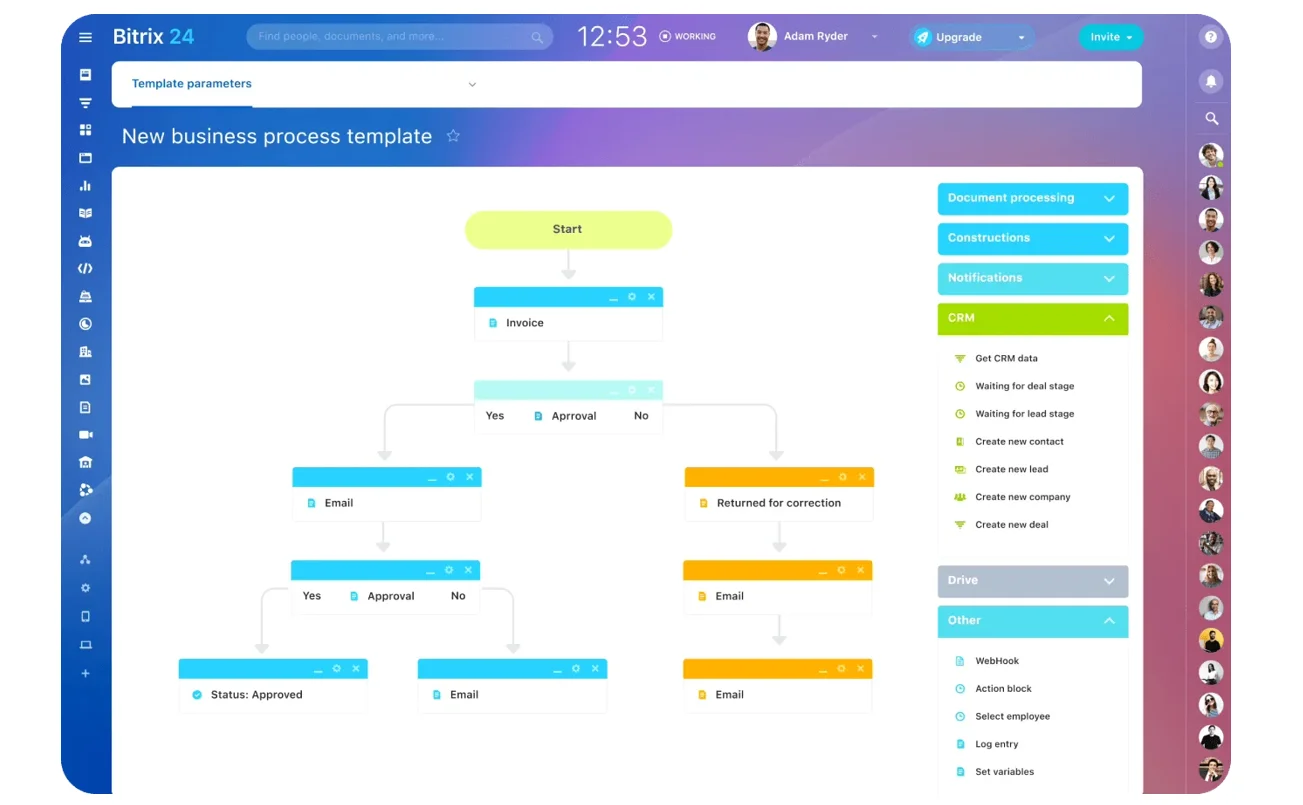
Different surfaces, same gain. Work is easier to assign, easier to monitor, and less likely to disappear between systems or people.
Operational impact, scaling benefits, and practical limits
Informal coordination gets less reliable as a business grows. The founder can't track everything personally. New hires don't know the unwritten rules. Bitrix24 helps by turning repeatable activity into shared systems instead of personal habits.
Scaling benefits
- Onboarding speeds up because work structure is visible to new people
- Reporting improves because task and CRM data live in one environment
- Cross-functional coordination tightens because sales, service, and admin aren't working from disconnected records
- Distributed teams benefit because visibility doesn't depend on sharing an office
Better workflow discipline also makes execution more reliable over time, which matters when customer volumes climb, handoffs multiply, or management needs more confidence in pipeline and delivery status.
In small businesses, growth usually exposes process weakness before it exposes market weakness.
Where the limits are
Bitrix24 isn't useful by default just because it's feature-rich. Adoption takes effort. Process design quality decides the outcome. Very small teams with simple needs may find parts of the platform heavier than they need if they switch everything on at once. Standardization has to leave room for flexibility, especially where exceptions are common.
The honest read: Bitrix24 can improve efficiency a lot, but only if the business uses it to clarify work rather than layer software over existing disorder.
Explore Bitrix24 for small business or start for free to see how it fits your team's current setup.
Automate workflows without extra admin
Bitrix24 brings CRM, tasks, chat, and approvals together so small teams cut follow-up gaps, reduce busywork, and scale reliably.
Try Bitrix24 nowFAQ: Practical questions small businesses ask about Bitrix24 workflow automation
Can Bitrix24 improve efficiency if a business only automates one area first, like sales follow-ups or task management?
Yes. You don't need to automate everything at once to get value. Starting with one pain point usually works better, because the team improves a visible workflow without the system feeling overwhelming. Sales follow-ups and task ownership are common first steps since the gains show up quickly.
If a small business has informal processes that change often, is Bitrix24 still useful without locking the team into rigid workflows?
Yes, as long as you treat the platform as structure for common patterns rather than a rigid script for every case. Most small teams need flexibility. The aim is to make recurring work visible and less dependent on memory while leaving room for exceptions, not to eliminate variation.
How does Bitrix24 help when work happens across chat, calls, and customer records at once, and where does that visibility stop?
It keeps communication, tasks, and CRM activity close together, so the context around work is easier to see in one place, which reduces information loss across channels. The limit is user behavior. If people keep handling critical work outside the system, visibility stays partial. The platform can centralize a workflow; it can't capture what the team won't record.


